> ## Documentation Index
> Fetch the complete documentation index at: https://docs.runpulse.com/llms.txt
> Use this file to discover all available pages before exploring further.
# Spreadsheet Processing
> Configure Extract for Excel workbooks, hidden content, raw values, and inflated used ranges.
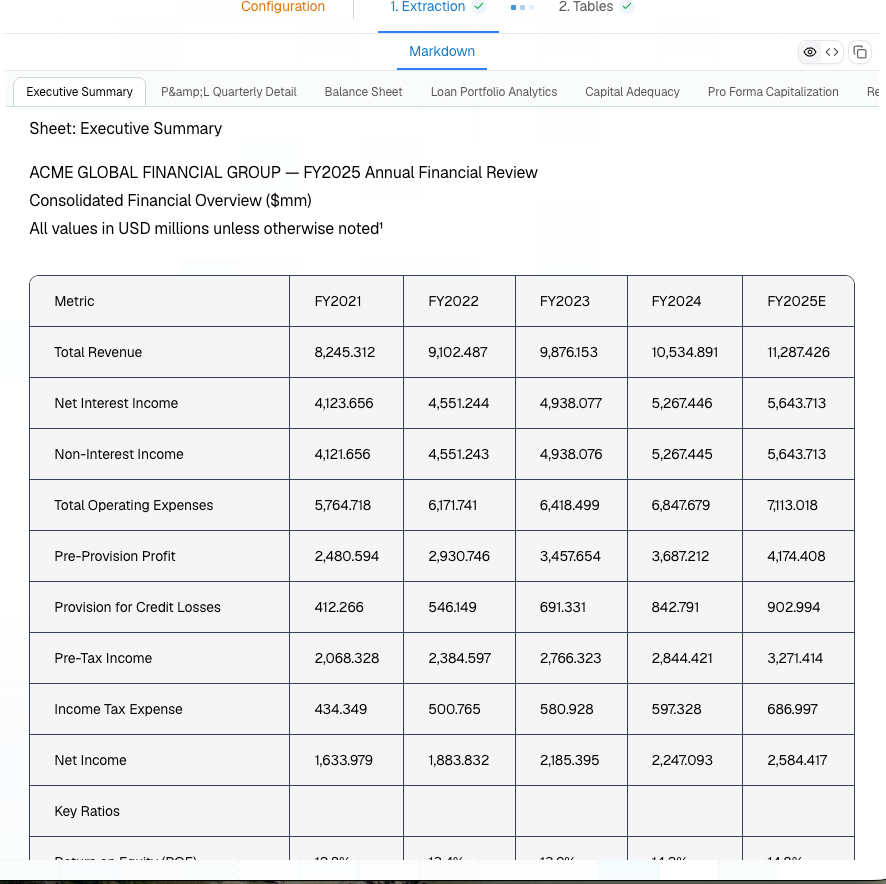
Use spreadsheet settings for Excel workbooks where the visual workbook structure matters. This is especially useful for financial models, loss runs, claims exports, underwriting workbooks, and operational reports exported from ERP or BI systems.
[Platform companion sample: Complex Table Document](https://platform.runpulse.com/dashboard/examples/0e36367a-16d2-49c8-99ab-a6fe0df70409)
 The most important settings are:
| Setting | Use when |
| ----------------------- | --------------------------------------------------------------------------------- |
| `include_hidden_rows` | Hidden rows contain data your workflow must audit. |
| `include_hidden_cols` | Hidden columns contain calculations, IDs, or source fields. |
| `include_hidden_sheets` | The workbook uses hidden support tabs that should be parsed. |
| `use_raw_values` | Downstream systems need exact numeric values instead of display-rounded text. |
| `only_data_rows` | The workbook has many empty trailing rows because of formatting or prior exports. |
| `only_data_cols` | The workbook has many empty trailing columns for the same reason. |
```json theme={null}
{
"file_url": "https://your-storage.example.com/acme-financial-review.xlsx",
"spreadsheet": {
"only_data_rows": true,
"only_data_cols": true,
"use_raw_values": true
}
}
```
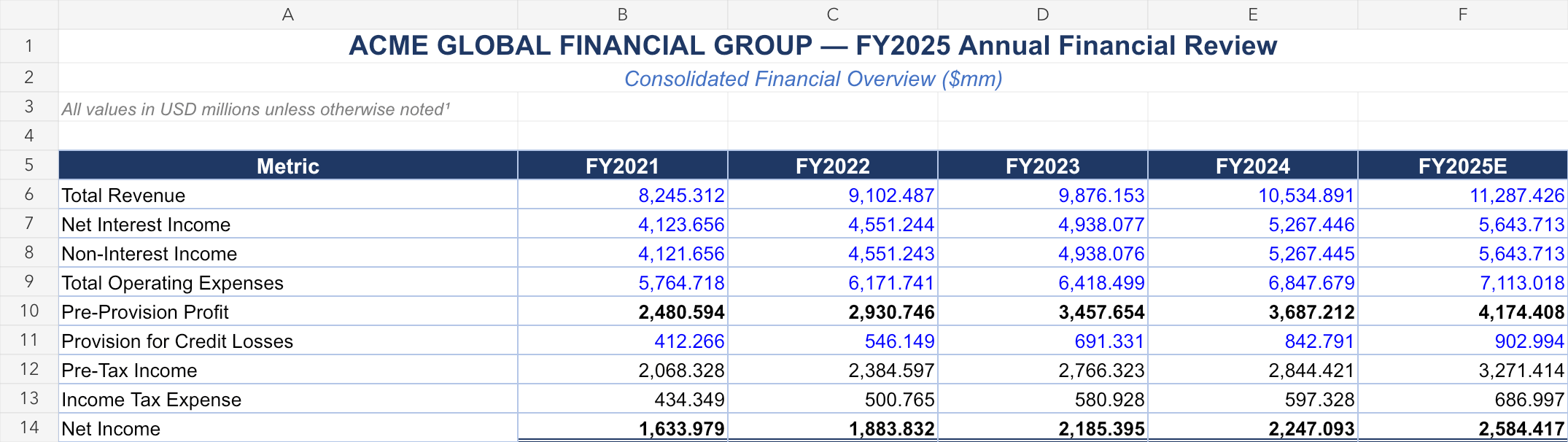
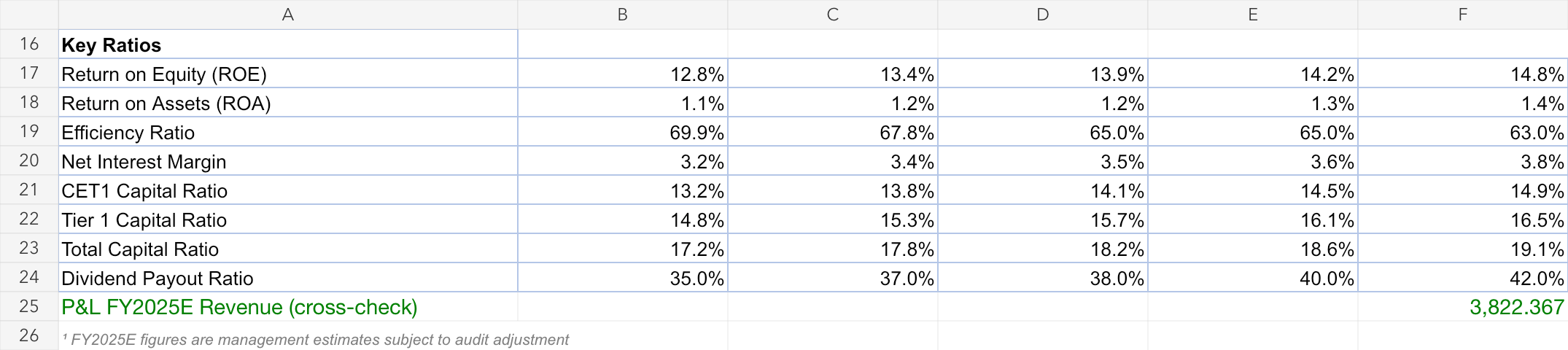
Here are compact previews from the ACME financial review workbook used for this section:
The most important settings are:
| Setting | Use when |
| ----------------------- | --------------------------------------------------------------------------------- |
| `include_hidden_rows` | Hidden rows contain data your workflow must audit. |
| `include_hidden_cols` | Hidden columns contain calculations, IDs, or source fields. |
| `include_hidden_sheets` | The workbook uses hidden support tabs that should be parsed. |
| `use_raw_values` | Downstream systems need exact numeric values instead of display-rounded text. |
| `only_data_rows` | The workbook has many empty trailing rows because of formatting or prior exports. |
| `only_data_cols` | The workbook has many empty trailing columns for the same reason. |
```json theme={null}
{
"file_url": "https://your-storage.example.com/acme-financial-review.xlsx",
"spreadsheet": {
"only_data_rows": true,
"only_data_cols": true,
"use_raw_values": true
}
}
```
Here are compact previews from the ACME financial review workbook used for this section:
 Public cookbook examples are mostly PDFs today. For table-heavy public samples, compare
[Complex Table Document](https://platform.runpulse.com/dashboard/examples/0e36367a-16d2-49c8-99ab-a6fe0df70409)
and [Research Report](https://platform.runpulse.com/dashboard/examples/65a31c06-184a-4156-823b-e1686a368b18), then upload your workbook in the Platform for spreadsheet-specific settings.
See every spreadsheet request option.
Public cookbook examples are mostly PDFs today. For table-heavy public samples, compare
[Complex Table Document](https://platform.runpulse.com/dashboard/examples/0e36367a-16d2-49c8-99ab-a6fe0df70409)
and [Research Report](https://platform.runpulse.com/dashboard/examples/65a31c06-184a-4156-823b-e1686a368b18), then upload your workbook in the Platform for spreadsheet-specific settings.
See every spreadsheet request option.