> ## Documentation Index
> Fetch the complete documentation index at: https://docs.runpulse.com/llms.txt
> Use this file to discover all available pages before exploring further.
# Financial Tables
> Extract table-first financial data for review and downstream workflows.
## Goal
Reconstruct financial tables from filings, statements, or reports, then send the resulting table data to review queues, databases, spreadsheets, or analytics workflows.
## Sample Documents
Use the built-in [Complex Table Document](https://platform.runpulse.com/dashboard/examples/0e36367a-16d2-49c8-99ab-a6fe0df70409) for span and hierarchy tests, or the [Research Report](https://platform.runpulse.com/dashboard/examples/65a31c06-184a-4156-823b-e1686a368b18) for a shorter table workflow. Both have saved Tables output in the Platform examples.
## Use This Workflow
```mermaid theme={null}
flowchart LR
A[Financial report] --> B["/extract"]
B --> C["/tables"]
C --> D[Structured tables]
D --> E[Review or downstream export]
```
Use **Tables** when preserving row and column relationships is more important than extracting a handful of named fields.
 ## Platform Steps
Upload the report and run Extract. Open the Tables tab to see detected native tables.
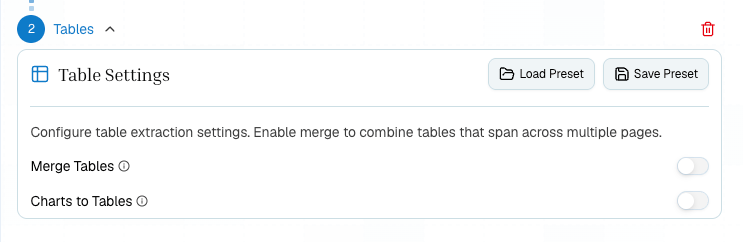
Add a Tables step when you need higher-fidelity table reconstruction, cross-page merging, or chart-to-table conversion.
Turn on merge for tables that continue across pages.
Review citations and table structure before sending output to a spreadsheet, database, or analyst workflow.
## Python
```python theme={null}
from pulse import Pulse
client = Pulse(api_key="YOUR_API_KEY")
extract_result = client.extract(
file_url="https://platform.runpulse.com/api/examples/0e36367a-16d2-49c8-99ab-a6fe0df70409/pdf"
)
tables_result = client.tables(
extraction_id=extract_result.extraction_id,
tables_config={
"merge": True,
"table_format": "html",
"charts_to_tables": True,
},
)
for index, table in enumerate(tables_result.tables_output["tables"], start=1):
print(f"Table {index}")
print("Citations:", table["citations"])
print(table["table_content"])
```
## TypeScript
```typescript theme={null}
import { PulseClient } from "pulse-ts-sdk";
const client = new PulseClient({ apiKey: "YOUR_API_KEY" });
const extractResult = await client.extract({
fileUrl: "https://platform.runpulse.com/api/examples/0e36367a-16d2-49c8-99ab-a6fe0df70409/pdf",
});
const tablesResult = await client.tables({
extraction_id: extractResult.extraction_id,
tables_config: {
merge: true,
table_format: "html",
charts_to_tables: true,
},
});
for (const table of tablesResult.tables_output.tables) {
console.log(table.citations);
console.log(table.table_content);
}
```
## Checks
* Use Tables for schedule-like outputs; use Schema for named summary fields.
* Enable merge only when cross-page continuity matters.
* Review citations when a table has complex headers or spans.
* Use chart-to-table conversion only when charts contain data you need as rows and columns.
* Store table citations or page references when extracted rows feed a regulated reporting or underwriting workflow.
## Related
Full endpoint reference.
Choose the right downstream step.
Try the Complex Table Document or Research Report.
## Platform Steps
Upload the report and run Extract. Open the Tables tab to see detected native tables.
Add a Tables step when you need higher-fidelity table reconstruction, cross-page merging, or chart-to-table conversion.
Turn on merge for tables that continue across pages.
Review citations and table structure before sending output to a spreadsheet, database, or analyst workflow.
## Python
```python theme={null}
from pulse import Pulse
client = Pulse(api_key="YOUR_API_KEY")
extract_result = client.extract(
file_url="https://platform.runpulse.com/api/examples/0e36367a-16d2-49c8-99ab-a6fe0df70409/pdf"
)
tables_result = client.tables(
extraction_id=extract_result.extraction_id,
tables_config={
"merge": True,
"table_format": "html",
"charts_to_tables": True,
},
)
for index, table in enumerate(tables_result.tables_output["tables"], start=1):
print(f"Table {index}")
print("Citations:", table["citations"])
print(table["table_content"])
```
## TypeScript
```typescript theme={null}
import { PulseClient } from "pulse-ts-sdk";
const client = new PulseClient({ apiKey: "YOUR_API_KEY" });
const extractResult = await client.extract({
fileUrl: "https://platform.runpulse.com/api/examples/0e36367a-16d2-49c8-99ab-a6fe0df70409/pdf",
});
const tablesResult = await client.tables({
extraction_id: extractResult.extraction_id,
tables_config: {
merge: true,
table_format: "html",
charts_to_tables: true,
},
});
for (const table of tablesResult.tables_output.tables) {
console.log(table.citations);
console.log(table.table_content);
}
```
## Checks
* Use Tables for schedule-like outputs; use Schema for named summary fields.
* Enable merge only when cross-page continuity matters.
* Review citations when a table has complex headers or spans.
* Use chart-to-table conversion only when charts contain data you need as rows and columns.
* Store table citations or page references when extracted rows feed a regulated reporting or underwriting workflow.
## Related
Full endpoint reference.
Choose the right downstream step.
Try the Complex Table Document or Research Report.