> ## Documentation Index
> Fetch the complete documentation index at: https://docs.runpulse.com/llms.txt
> Use this file to discover all available pages before exploring further.
# Spreadsheet Financial Review
> Extract Excel workbooks with hidden-content controls, raw values, and phantom-cell trimming.
## Goal
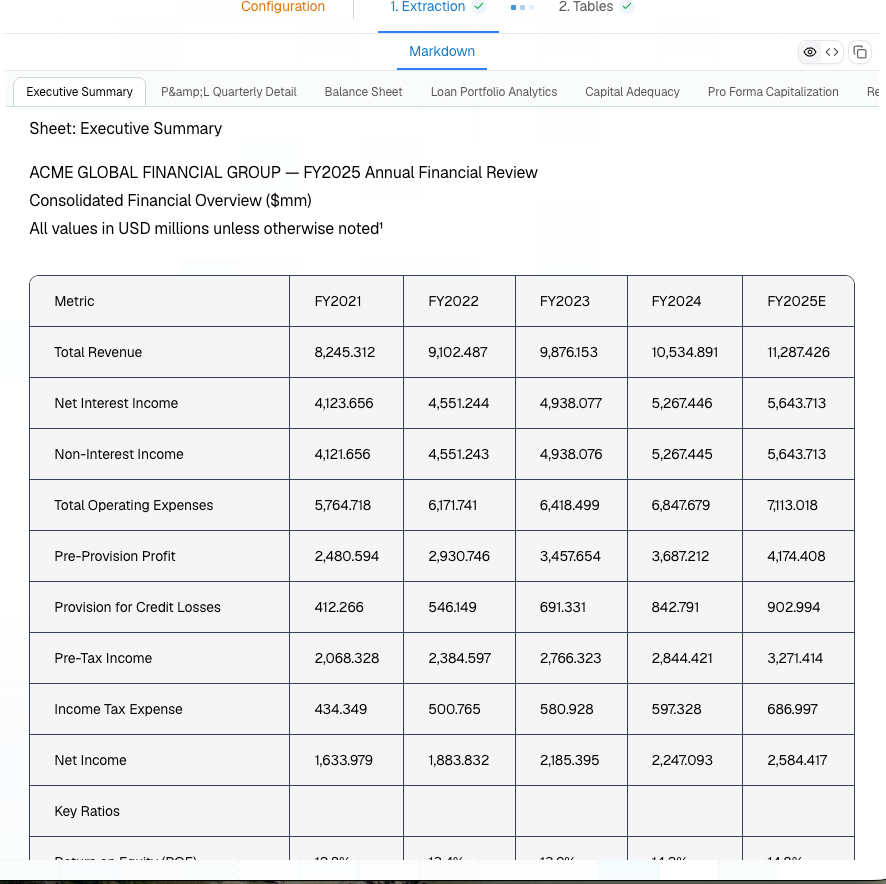
Parse an Excel workbook into markdown that preserves sheet structure, while controlling hidden rows, hidden sheets, display formatting, and inflated used ranges.
## Use This Workflow
```mermaid theme={null}
flowchart LR
A[Workbook] --> B["/extract with spreadsheet settings"]
B --> C[Sheet-aware markdown]
C --> D["Schema, Tables, or review"]
```
Use this for financial models, loss runs, claims exports, underwriting workbooks, and operational reports.
## Platform Preview
 ## Request
```bash theme={null}
curl -X POST https://api.runpulse.com/extract \
-H "x-api-key: YOUR_API_KEY" \
-H "Content-Type: application/json" \
-d '{
"file_url": "https://your-storage.example.com/acme-financial-review.xlsx",
"spreadsheet": {
"include_hidden_rows": false,
"include_hidden_cols": false,
"include_hidden_sheets": false,
"use_raw_values": true,
"only_data_rows": true,
"only_data_cols": true
},
"async": true,
"storage": {"enabled": true}
}'
```
## Settings
| Setting | Recommended default | Change it when |
| --------------------------------------------- | ----------------------------- | ---------------------------------------------------- |
| `use_raw_values` | `true` for financial data | You want values exactly as displayed in Excel. |
| `only_data_rows` | `true` for exported workbooks | Empty trailing rows are intentionally meaningful. |
| `only_data_cols` | `true` for exported workbooks | Empty trailing columns are intentionally meaningful. |
| `include_hidden_sheets` | `false` | Hidden support sheets contain auditable source data. |
| `include_hidden_rows` / `include_hidden_cols` | `false` | Hidden content is part of the business record. |
## Checks
* Compare totals in extracted markdown against visible workbook totals.
* Decide whether hidden sheets are data, calculations, or irrelevant workbook machinery.
* Use raw values for downstream calculations and display values for human-facing reports.
* Store the workbook filename, sheet name, and extraction ID with downstream records.
* Test on real exported workbooks; phantom rows are usually system-specific.
## Related
Spreadsheet parameter guide.
Table-first PDF workflows.
## Request
```bash theme={null}
curl -X POST https://api.runpulse.com/extract \
-H "x-api-key: YOUR_API_KEY" \
-H "Content-Type: application/json" \
-d '{
"file_url": "https://your-storage.example.com/acme-financial-review.xlsx",
"spreadsheet": {
"include_hidden_rows": false,
"include_hidden_cols": false,
"include_hidden_sheets": false,
"use_raw_values": true,
"only_data_rows": true,
"only_data_cols": true
},
"async": true,
"storage": {"enabled": true}
}'
```
## Settings
| Setting | Recommended default | Change it when |
| --------------------------------------------- | ----------------------------- | ---------------------------------------------------- |
| `use_raw_values` | `true` for financial data | You want values exactly as displayed in Excel. |
| `only_data_rows` | `true` for exported workbooks | Empty trailing rows are intentionally meaningful. |
| `only_data_cols` | `true` for exported workbooks | Empty trailing columns are intentionally meaningful. |
| `include_hidden_sheets` | `false` | Hidden support sheets contain auditable source data. |
| `include_hidden_rows` / `include_hidden_cols` | `false` | Hidden content is part of the business record. |
## Checks
* Compare totals in extracted markdown against visible workbook totals.
* Decide whether hidden sheets are data, calculations, or irrelevant workbook machinery.
* Use raw values for downstream calculations and display values for human-facing reports.
* Store the workbook filename, sheet name, and extraction ID with downstream records.
* Test on real exported workbooks; phantom rows are usually system-specific.
## Related
Spreadsheet parameter guide.
Table-first PDF workflows.