> ## Documentation Index
> Fetch the complete documentation index at: https://docs.runpulse.com/llms.txt
> Use this file to discover all available pages before exploring further.
# Extract → Schema
> Extract a document and apply a JSON Schema to pull structured fields — perfect for invoices, forms, and single-structure documents.
## Overview
The **Extract → Schema** pipeline adds structured data extraction on top of the base extraction. You define a JSON Schema describing the fields you want, and Pulse extracts them from the entire document as structured JSON with citations.
```mermaid theme={null}
flowchart LR
A[Upload document] --> B["/extract"]
B --> C[Markdown + Tables]
C --> D["/schema"]
D --> E[Structured JSON + Citations]
```
***
## When to Use
* **Invoice processing** — extract vendor name, invoice number, line items, totals
* **Form extraction** — pull fields from applications, tax forms, insurance claims
* **Contract parsing** — extract parties, dates, clauses, obligations
* **Single-structure documents** — any document where one schema covers the entire content
If your document has **distinct sections** that need **different schemas** (e.g., an annual report with Financials, Leadership, and Outlook), use [Extract → Split → Schema](/platform-reference/extract-split-schema) instead.
***
## How to Use in the Playground
### Configure extraction settings
Set page range, figure extraction, chunking, and other options on the **Configuration** tab — same as [Extract Only](/platform-reference/extract).
### Define your schema
Switch to the **Schema** step in the pipeline tabs. Define a JSON Schema describing the fields you want to extract:
```json theme={null}
{
"type": "object",
"properties": {
"invoice_number": { "type": "string", "description": "The invoice identifier" },
"vendor_name": { "type": "string", "description": "Name of the vendor or seller" },
"total_amount": { "type": "number", "description": "Total amount due" },
"due_date": { "type": "string", "description": "Payment due date" },
"line_items": {
"type": "array",
"items": {
"type": "object",
"properties": {
"description": { "type": "string" },
"quantity": { "type": "integer" },
"unit_price": { "type": "number" }
}
}
}
},
"required": ["invoice_number", "vendor_name"]
}
```
Optionally add a **schema prompt** to guide the extraction — e.g., *"Extract billing details from this invoice. Line items should include all products listed."*
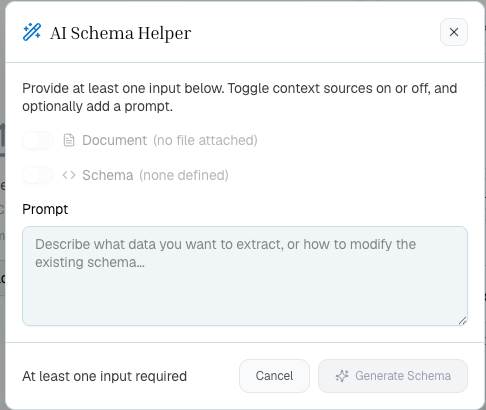
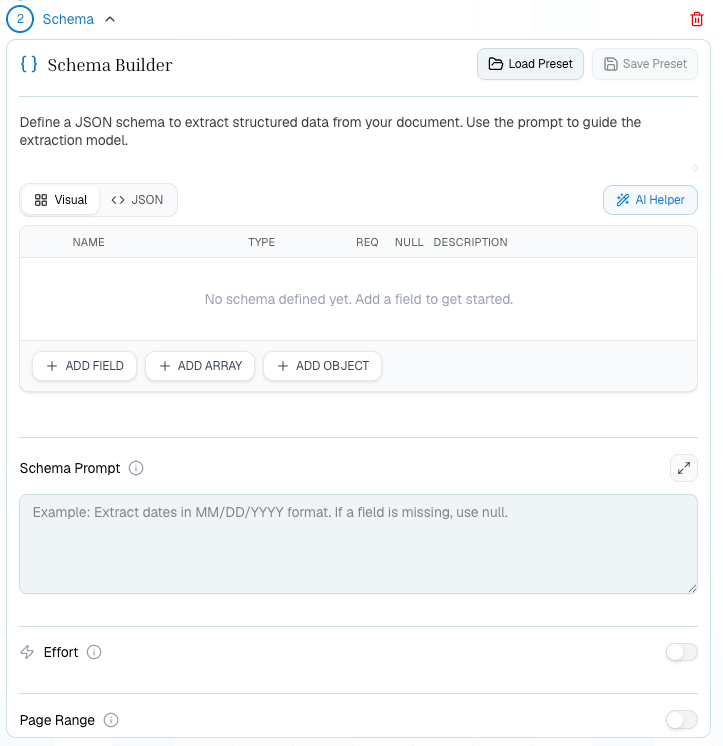 Use the **AI Helper** to draft or adjust a schema from a plain-language prompt, the attached document, or an existing schema.
 ### Upload and extract
Click **Extract All**. The pipeline runs both steps automatically:
1. **Extract** — processes the document into markdown
2. **Schema** — applies your schema to the extracted content
### Review structured output
Results appear in the **Schema** tab as structured JSON. Each extracted field includes **citations** pointing to the exact location in the document where the value was found.
***
## What You Get Back
Everything from [Extract](/platform-reference/extract), plus:
| Field | Description |
| ------------------------- | ------------------------------------------------ |
| `schema_output.values` | Extracted field values matching your JSON Schema |
| `schema_output.citations` | Source locations for each extracted value |
| `schema_id` | Saved schema result ID |
***
## Schema Tips
The `description` property in your JSON Schema helps Pulse understand what to look for. Be specific:
```json theme={null}
// Good
"vendor_name": { "type": "string", "description": "Full legal name of the vendor or seller, as shown in the invoice header" }
// Less helpful
"vendor_name": { "type": "string" }
```
Mark fields as `required` when you know they'll always be present. Optional fields are returned as `null` if not found.
For tables or lists in the document (line items, attendees, clauses), use `"type": "array"` with an `items` schema.
The schema prompt gives the extraction model additional context. Use it to clarify ambiguities or specify preferences.
If your schema has many nested fields or the document layout is complex, enable **Effort mode** in the extraction settings for higher accuracy.
***
## API Usage
```python theme={null}
from pulse import Pulse
client = Pulse(api_key="YOUR_API_KEY")
# Step 1: Extract the document
extract_result = client.extract(
file=open("invoice.pdf", "rb"),
async_=True,
storage={"enabled": True}
)
# Poll for completion, then get extraction_id
extraction_id = extract_result.extraction_id
# Step 2: Apply schema
schema_result = client.schema(
extraction_id=extraction_id,
schema_config={
"input_schema": {
"type": "object",
"properties": {
"invoice_number": {"type": "string"},
"vendor_name": {"type": "string"},
"total_amount": {"type": "number"},
"line_items": {
"type": "array",
"items": {
"type": "object",
"properties": {
"description": {"type": "string"},
"quantity": {"type": "integer"},
"unit_price": {"type": "number"}
}
}
}
},
"required": ["invoice_number", "vendor_name"]
},
"schema_prompt": "Extract all billing details from this invoice"
}
)
print(schema_result.schema_output)
```
```typescript theme={null}
import { PulseClient } from "pulse-ts-sdk";
import fs from "fs";
const client = new PulseClient({
apiKey: "YOUR_API_KEY"
});
// Step 1: Extract the document
const extractResult = await client.extract({
file: fs.createReadStream("invoice.pdf"),
async: true,
storage: { enabled: true }
});
// Poll for completion, then get extraction_id
const extractionId = extractResult.extraction_id;
// Step 2: Apply schema
const schemaResult = await client.schema({
extraction_id: extractionId,
schema_config: {
input_schema: {
type: "object",
properties: {
invoice_number: { type: "string" },
vendor_name: { type: "string" },
total_amount: { type: "number" },
line_items: {
type: "array",
items: {
type: "object",
properties: {
description: { type: "string" },
quantity: { type: "integer" },
unit_price: { type: "number" }
}
}
}
},
required: ["invoice_number", "vendor_name"]
},
schema_prompt: "Extract all billing details from this invoice"
}
});
console.log(schemaResult.schema_output);
```
```bash theme={null}
# Step 1: Extract the document
curl -X POST https://api.runpulse.com/extract \
-H "x-api-key: YOUR_API_KEY" \
-F "file=@invoice.pdf" \
-F "async=true" \
-F 'storage={"enabled": true}'
# Save extraction_id from the response
# EXTRACTION_ID=""
# Step 2: Apply schema
curl -X POST https://api.runpulse.com/schema \
-H "x-api-key: YOUR_API_KEY" \
-H "Content-Type: application/json" \
-d '{
"extraction_id": "EXTRACTION_ID",
"schema_config": {
"input_schema": {
"type": "object",
"properties": {
"invoice_number": {"type": "string"},
"vendor_name": {"type": "string"},
"total_amount": {"type": "number"}
},
"required": ["invoice_number", "vendor_name"]
},
"schema_prompt": "Extract all billing details from this invoice"
}
}'
```
***
## Iterating on Your Schema
You don't need to re-extract the document to try a different schema. Use a **Schema-Only Rerun** — see [Reruns](/platform-reference/reruns) for details.
***
## Related
Full API documentation for the `/schema` endpoint
Best practices for writing effective schemas
### Upload and extract
Click **Extract All**. The pipeline runs both steps automatically:
1. **Extract** — processes the document into markdown
2. **Schema** — applies your schema to the extracted content
### Review structured output
Results appear in the **Schema** tab as structured JSON. Each extracted field includes **citations** pointing to the exact location in the document where the value was found.
***
## What You Get Back
Everything from [Extract](/platform-reference/extract), plus:
| Field | Description |
| ------------------------- | ------------------------------------------------ |
| `schema_output.values` | Extracted field values matching your JSON Schema |
| `schema_output.citations` | Source locations for each extracted value |
| `schema_id` | Saved schema result ID |
***
## Schema Tips
The `description` property in your JSON Schema helps Pulse understand what to look for. Be specific:
```json theme={null}
// Good
"vendor_name": { "type": "string", "description": "Full legal name of the vendor or seller, as shown in the invoice header" }
// Less helpful
"vendor_name": { "type": "string" }
```
Mark fields as `required` when you know they'll always be present. Optional fields are returned as `null` if not found.
For tables or lists in the document (line items, attendees, clauses), use `"type": "array"` with an `items` schema.
The schema prompt gives the extraction model additional context. Use it to clarify ambiguities or specify preferences.
If your schema has many nested fields or the document layout is complex, enable **Effort mode** in the extraction settings for higher accuracy.
***
## API Usage
```python theme={null}
from pulse import Pulse
client = Pulse(api_key="YOUR_API_KEY")
# Step 1: Extract the document
extract_result = client.extract(
file=open("invoice.pdf", "rb"),
async_=True,
storage={"enabled": True}
)
# Poll for completion, then get extraction_id
extraction_id = extract_result.extraction_id
# Step 2: Apply schema
schema_result = client.schema(
extraction_id=extraction_id,
schema_config={
"input_schema": {
"type": "object",
"properties": {
"invoice_number": {"type": "string"},
"vendor_name": {"type": "string"},
"total_amount": {"type": "number"},
"line_items": {
"type": "array",
"items": {
"type": "object",
"properties": {
"description": {"type": "string"},
"quantity": {"type": "integer"},
"unit_price": {"type": "number"}
}
}
}
},
"required": ["invoice_number", "vendor_name"]
},
"schema_prompt": "Extract all billing details from this invoice"
}
)
print(schema_result.schema_output)
```
```typescript theme={null}
import { PulseClient } from "pulse-ts-sdk";
import fs from "fs";
const client = new PulseClient({
apiKey: "YOUR_API_KEY"
});
// Step 1: Extract the document
const extractResult = await client.extract({
file: fs.createReadStream("invoice.pdf"),
async: true,
storage: { enabled: true }
});
// Poll for completion, then get extraction_id
const extractionId = extractResult.extraction_id;
// Step 2: Apply schema
const schemaResult = await client.schema({
extraction_id: extractionId,
schema_config: {
input_schema: {
type: "object",
properties: {
invoice_number: { type: "string" },
vendor_name: { type: "string" },
total_amount: { type: "number" },
line_items: {
type: "array",
items: {
type: "object",
properties: {
description: { type: "string" },
quantity: { type: "integer" },
unit_price: { type: "number" }
}
}
}
},
required: ["invoice_number", "vendor_name"]
},
schema_prompt: "Extract all billing details from this invoice"
}
});
console.log(schemaResult.schema_output);
```
```bash theme={null}
# Step 1: Extract the document
curl -X POST https://api.runpulse.com/extract \
-H "x-api-key: YOUR_API_KEY" \
-F "file=@invoice.pdf" \
-F "async=true" \
-F 'storage={"enabled": true}'
# Save extraction_id from the response
# EXTRACTION_ID=""
# Step 2: Apply schema
curl -X POST https://api.runpulse.com/schema \
-H "x-api-key: YOUR_API_KEY" \
-H "Content-Type: application/json" \
-d '{
"extraction_id": "EXTRACTION_ID",
"schema_config": {
"input_schema": {
"type": "object",
"properties": {
"invoice_number": {"type": "string"},
"vendor_name": {"type": "string"},
"total_amount": {"type": "number"}
},
"required": ["invoice_number", "vendor_name"]
},
"schema_prompt": "Extract all billing details from this invoice"
}
}'
```
***
## Iterating on Your Schema
You don't need to re-extract the document to try a different schema. Use a **Schema-Only Rerun** — see [Reruns](/platform-reference/reruns) for details.
***
## Related
Full API documentation for the `/schema` endpoint
Best practices for writing effective schemas