
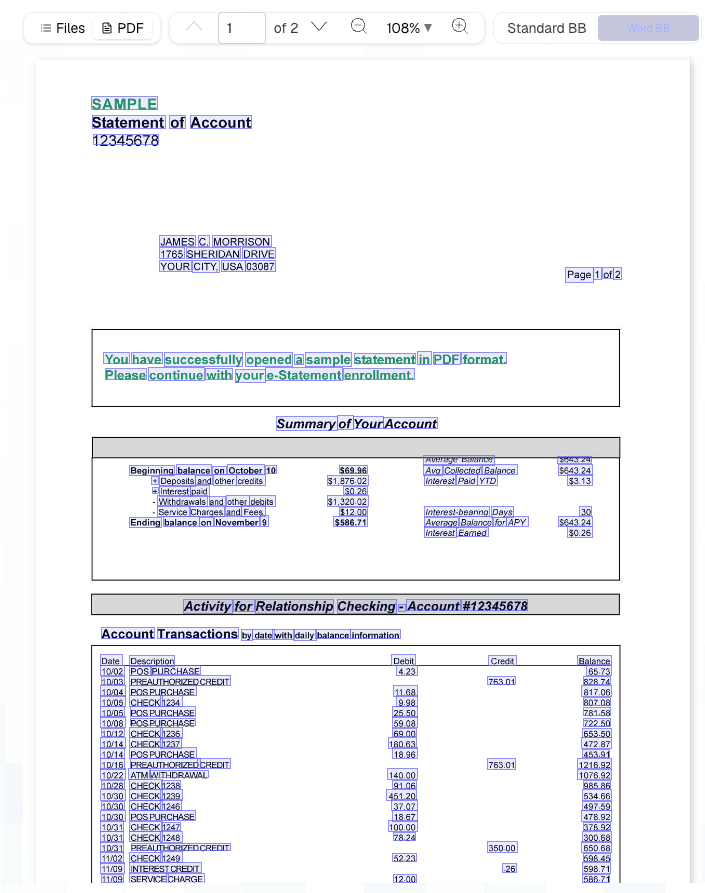
Word-level boxes drawn over a bank statement.
What you need
- The Python SDK and an API key, set up as in Cookbooks.
- Word boxes enabled for your organization. Without them, a parse that asks for word boxes is refused with a
400; ask support to turn them on. - A document to review. This recipe uses the Bank Statement sample, which has 2 pages.
Build it
1
Parse with word boxes
This call parses the statement and waits for it to finish. Word boxes make a result much larger. Ask for them only on documents someone will review.
word_level_bounding_boxes adds every word, with its box, to the result.2
Extract the value
This code fills a one-field schema from the parse and reads the value with its citation.
3
Read the parse
This code reads the parse, indexes its elements and table cells by Read the parse only after every step on it has finished: where results are deleted on first read, a parse you’ve already read can’t feed another step.
id, and keeps its word boxes.4
Find the value's words
highlight returns the words a value was read from. For a cited table cell, that’s every word in the cell. For any other element, it’s the element’s words that match the value’s text.5
Convert the boxes to pixels
A Draw each box over page
bbox is the four corners of a box, clockwise from the top-left, as fractions of the page’s width and height. This code converts each word’s box to pixels on a page image.word.page in your viewer. Store the parse_id, page and box with each review note to draw it again later.How it works
A value’s citation names a parse element, and that element’s box picks out the word boxes inside it:citation[].element_idis theidof one of the parse’selements.citation[].sub_element_id, when present, is theidof a cell in that table’scells.- Word boxes are
Wordelements, with acontent,pageandbbox, inextensions.word_level_bounding_boxes.
Edge cases
A value with no highlight
A value with no highlight
A value with an empty
citation list can’t be placed. Neither can a value read from a spreadsheet, whose elements have no bbox, or from a caption without one. Show these values without a highlight.Numbers that don't match their words
Numbers that don't match their words
Matching compares text, so a value can be written differently from its words, such as
1234.5 for “1,234.50”. When no word matches, highlight the whole cited element instead.Next steps
Elements and bounding boxes
Element ids, box coordinates and word boxes.
Extract
Schemas, citations and confidence scores.