
Goal
Reconstruct financial tables from filings, statements, or reports, then send the resulting table data to review queues, databases, spreadsheets, or analytics workflows.Sample Documents
Use the built-in Complex Table Document for span and hierarchy tests, or the Research Report for a shorter table workflow. Both have saved Tables output in the Platform examples.Use This Workflow
Use Tables when preserving row and column relationships is more important than extracting a handful of named fields.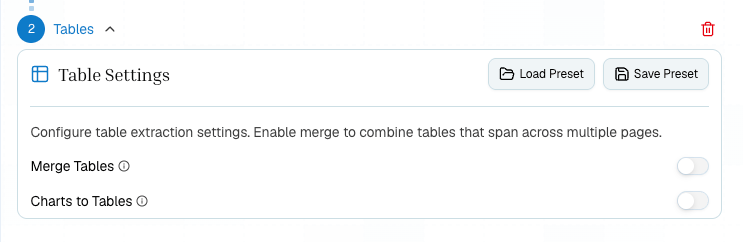
Platform Steps
1
Extract the document
Upload the report and run Extract. Open the Tables tab to see detected native tables.
2
Add Tables
Add a Tables step when you need higher-fidelity table reconstruction, cross-page merging, or chart-to-table conversion.
3
Enable merge
Turn on merge for tables that continue across pages.
4
Review and export
Review citations and table structure before sending output to a spreadsheet, database, or analyst workflow.
Python
TypeScript
Checks
- Use Tables for schedule-like outputs; use Schema for named summary fields.
- Enable merge only when cross-page continuity matters.
- Review citations when a table has complex headers or spans.
- Use chart-to-table conversion only when charts contain data you need as rows and columns.
- Store table citations or page references when extracted rows feed a regulated reporting or underwriting workflow.
Related
Tables API
Full endpoint reference.
Schema, Tables, Or Split
Choose the right downstream step.
Sample Documents
Try the Complex Table Document or Research Report.