
markdown, and as elements, the document’s pieces in reading order, each with what it is, its content and where it sits on its page. Use elements to show where something came from, for example to highlight a value on the page.
What an element holds
This is one element:
A
Figure’s caption is a separate Caption element. Two more categories appear outside the elements list: Cell, for table cells, and Word, for word boxes.
Tables and cells
ATable element has dimensions, its number of rows and columns, and cells, listed row by row. Each cell has its own content, page and bbox, a row and a column, counting from 0, and a row_span or column_span when it covers more than one. A cell’s id adds its row and column to its table’s, as in Table-3-r0c2.
Bounding boxes
An element’sbbox lists its four corners as eight numbers, [x1, y1, …, x4, y4], clockwise from the top-left. Each x is a fraction of the page’s width, and each y a fraction of its height, measured from the page’s top-left corner. Every value is between 0 and 1.
To draw a box on a page image, multiply each x by the image’s width and each y by its height:
x and y.
bbox is null on some picture captions, and on every spreadsheet element, which names its sheet and its cells’ range instead, such as B2:D2.
Word boxes
With"word_level_bounding_boxes": true in config.extensions, the result lists every word as a Word element, with its bbox, in extensions.word_level_bounding_boxes. Your organization must have word boxes enabled; to enable them, contact support.
These dashboard screenshots show element boxes, then word boxes, on the same bank statement:
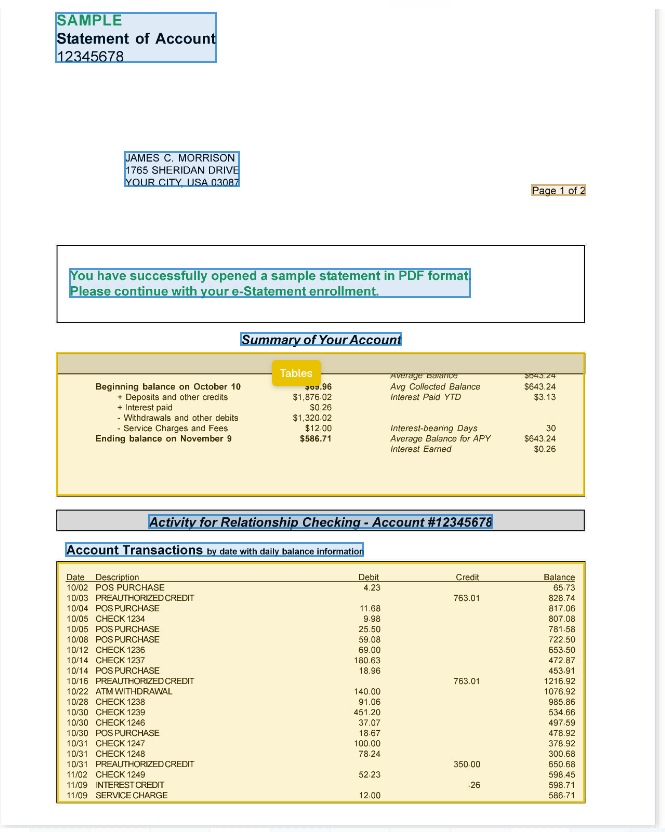
Element boxes (the default): one per text block or table.
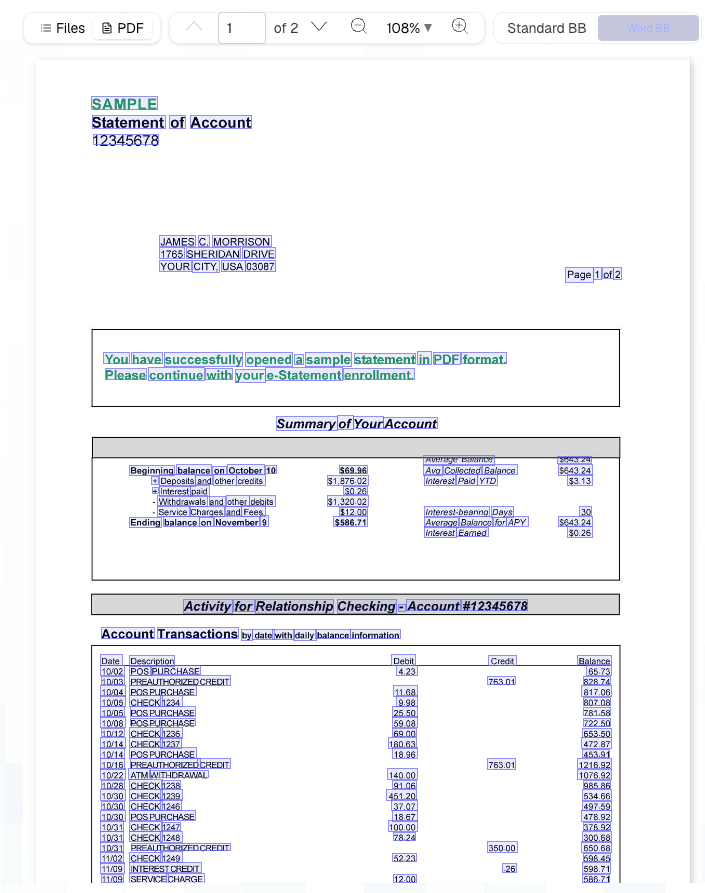
Word boxes: one per word.
Link Markdown and citations to elements
To find an element in the Markdown, ask fortagged_md in config.extensions.additional_formats. The result’s extensions.additional_formats.tagged_md is the Markdown with each element’s id in a data-element-id attribute. Tables, cells and figures carry the attribute on their own tags, and each text block is wrapped in a <div> that carries it:
<div> wrappers, the text is the same as markdown. An element that Pulse can’t find in the Markdown is left untagged.
Extract’s citations use the same ids: each value in extraction.enriched carries a citation list of the elements it came from: